
Why Live Transcriptions Are Hard
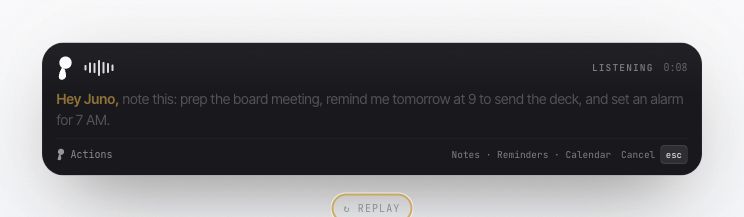
Hey Juno!
Most people think dictation is a speech recognition problem. You speak. A model transcribes. Text appears.
That framing is why so many voice products feel almost good and still break the moment you try to use them for real writing. The hard part is not only recognizing speech. The hard part is deciding, while someone is still talking, which words are safe to show, which words are still guesses, which words need help from context, and which words must never be committed because the model is filling in a silence, a cutoff, or a phrase it has seen too many times before.
This was the lesson behind Juno.
Juno's shortcut flow is toggle-based: press the shortcut to start dictation, speak, then press the shortcut again to stop and deliver the text.

This screenshot is a useful reminder of the category. In a Gemini session, the assistant pointed out likely dictation errors in the prompt itself: "except me" had become "fraction me," and "messy feat" had become "messy feet." The point is not that one tool failed in one funny way. The point is that batch dictation discovers the problem late. By the time the assistant notices, the user's writing flow has already been polluted.
Voice writing cannot only be clever after the fact. It has to be trustworthy while the sentence is forming.
The Lie Of The Final Transcript
Final transcription hides a lot of complexity.
If a system waits until you stop speaking, it gets the whole utterance. It can use right context, punctuation, cleanup, and a slower pass. It can produce something polished enough that the demo looks fine.
Live writing does not have that luxury. The product has to show text while the user is still deciding what to say next. That means it is operating on partial audio, rolling windows, clipped phonemes, silence, background noise, the focused app, selected text, and whatever the user just corrected two seconds ago.
A live transcript is not a final transcript displayed early. It is a stream of unstable evidence.
Streaming ASR research has known this for years. Partial hypotheses flicker: words appear, change, disappear, and reappear as more audio arrives. Whisper is a strong speech model, but it was not designed as a realtime transcription system; Whisper-Streaming had to add LocalAgreement because raw Whisper output is not a stable live interface. Contextual biasing research has the same shape: recognizing rare names and domain terms is hard enough offline, and harder when the relevant word spans multiple streaming chunks.
In product terms, this means a naive live HUD is dangerous. If you show every hypothesis immediately, the UI flickers. If you wait too long, the app feels dead. If you commit too early, the model's guess becomes the user's sentence.
Juno had to learn where that boundary is.
The Tail Was Where Everything Broke
The first live HUD architecture looked obvious: run Whisper on rolling windows, compare hypotheses, commit the stable prefix, show the rest as a tail.
That got us close. Then reality started finding the edges.
In one traced session, the user said a phrase like: "the moment it listens to Hey Juno, it stops working." The rolling audio window ended in the dangerous zone, right around the cutoff. Whisper completed the partial speech as "Hey Juno, I don't know." The bad completion appeared stable across consecutive decodes of nearly the same buffer, which meant a simple agreement algorithm would commit it. Once text entered the committed lane, the HUD treated it as real speech and would not repair it later.
That failure taught us the most important rule in Juno's live system: agreement is necessary, but not sufficient.
We added a draft horizon. Words whose timestamps end inside the last few hundred milliseconds of buffered audio are demoted back into the tail, even if they appear to agree. They need one more decode with more audio before they become trusted. This protects the exact region where models complete a clipped word with a plausible continuation.
Then we found more tail failures.
Silent windows could produce text. Short padded audio could produce confident junk. Whisper could loop phrases. A tail could end in a known subtitle artifact like "thank you." A buffer trim could leave a dangling boundary letter on screen. An empty decode over a trimmed buffer could erase a real faint tail. A segment-final flush could promote words that were only stable because nothing new had arrived.
Each bug became another rule:
- Committed text and tail text are different objects, not one string.
- The tail can be useful without being trusted.
- The HUD must not render suspicious tail text just because it exists.
- Silence guesses can remain internal evidence without becoming UI truth.
- True utterance end can rescue faint final words, but only through content guards.
- Committed text must be append-mostly, with narrow boundary repair for replays and duplicate stems.
That is why Juno's live transcript is a state machine, not a text box.
The Architecture We Ended Up Building
The speech model still matters. Juno uses MLX Whisper large-v3-turbo on Apple Silicon for the live preview and final speech lanes because it gives us a strong local base with practical latency.
But the model is not the product. The product is the loop around the model.
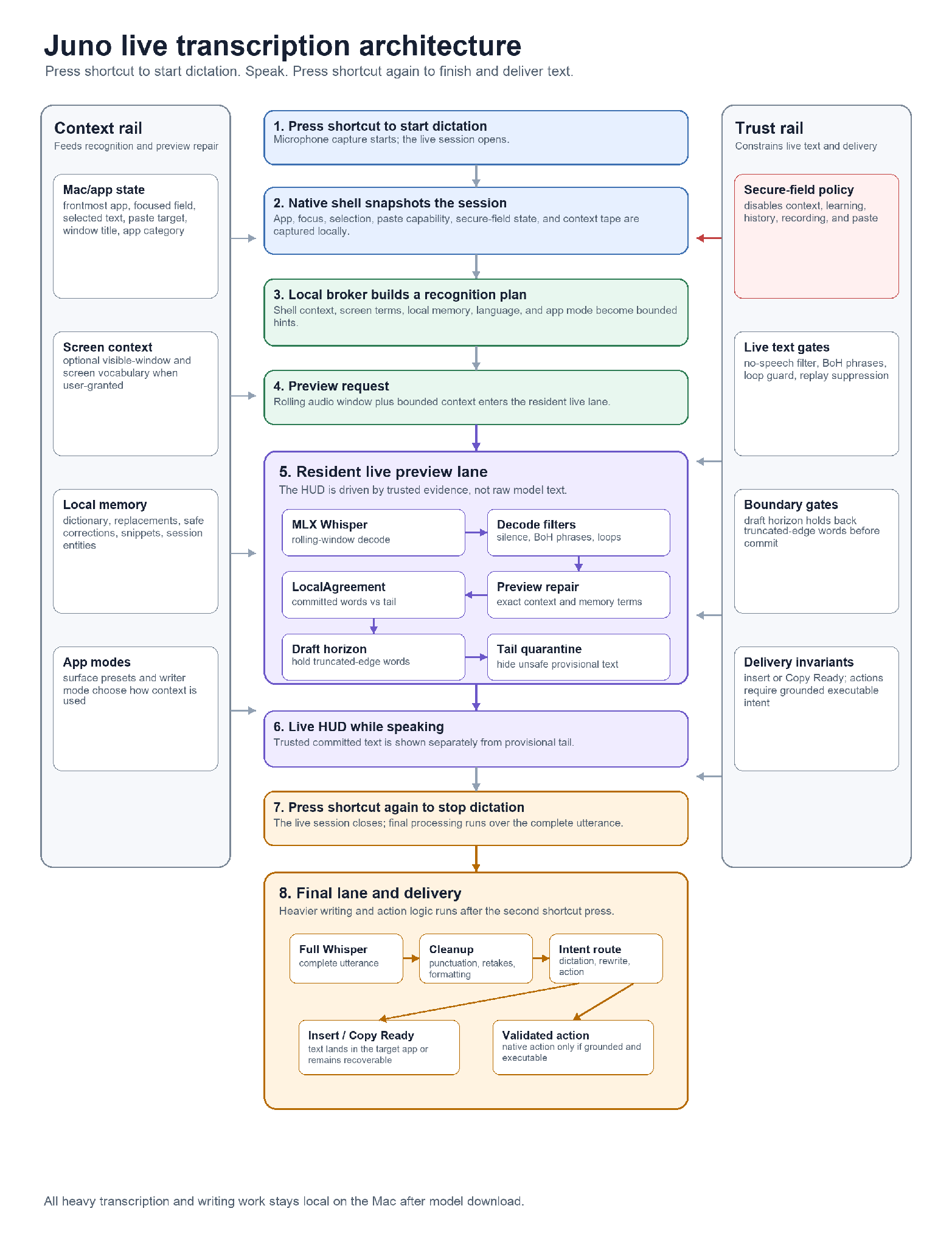
This is the shape that made the product work.
First, the Mac shell captures the session. It knows the frontmost app, focused field, selected text, paste capability, secure-field status, window title, app category, and optional screen terms when the user has granted access. It also preserves start selection, because a rewrite command should not lose the selected text just because focus or selection changed while the user was speaking.
Then the engine builds a context plan. Recent screen terms become candidate entities. Local memory contributes vocabulary, replacements, safe corrections, snippets, and session entities. App-level presets can influence the mode and whether window titles should be included. The bias plan sends a small, bounded set of terms into the speech and writer lanes.
Then the preview lane decodes rolling windows. Before words reach LocalAgreement, Juno can repair obvious preview terms using candidate entities, recent screen terms, and memory lexicon entries. This is not broad rewriting. It is narrow repair for the words that matter most in dictation: names, product terms, file names, project labels, and the user's own vocabulary.
Then the agreement layer decides what can be committed. Tail hallucination guards, loop guards, no-speech checks, draft-horizon demotion, boundary replay suppression, and orthography protection all run before the HUD presents the result.
Only after the user presses the shortcut again to stop dictation does the final lane do heavier work: final Whisper, deterministic formatting, correction, action detection, rewrite routing, memory learning, and insertion. The writer/planner lives there, not in the live HUD, because a live transcript should be faithful before it is clever.
All of this happens in the small window between the first shortcut press, the second shortcut press, and the text landing.
Context Has To Be Fast, Local, And Bounded
Personalization is one of the reasons live dictation is hard to do well.
Generic ASR can hear common English. It struggles with your world: teammate names, repo names, app names, symbols, product terms, unusual capitalization, snippets, and the word currently visible on your screen. If the model hears "Qwen" as "Quinn" or a product name as ordinary words, the transcript may be phonetically reasonable and still useless.
Juno does not solve this by training on the user. It solves it by building a local, bounded context packet for each utterance.
The packet can include lexicon terms, replacements, safe learned corrections, session entities, snippets, selected text terms, recent screen terms, and app context. The preview lane uses this for exact or explicit-alias repairs. The final lane uses it for protected terms and writer decisions. The memory layer only learns from successful commits, not from arbitrary preview noise.
Just as important, the context system knows when to disappear. Secure fields strip selected text, focused text, clipboard text, candidate entities, learning, history, recording, and paste. Privacy is not a prompt instruction. It is a shell-side policy that changes what the engine is allowed to see and do.
That local context loop is why Juno can feel personal without becoming a cloud profile.
Why This Is Rare
It is tempting to describe live transcription as a model-quality race. That is only part of it.
To make live voice writing feel good, you have to solve several problems at once:
- Streaming ASR latency.
- Partial hypothesis stability.
- Hallucination and silence handling.
- Rolling-window boundary errors.
- Screen and app context capture.
- Rare-term personalization.
- Selected-text preservation.
- Final-vs-live reconciliation.
- Native insertion and paste fallback.
- Action safety.
- Secure-field privacy.
- Local model residency and memory pressure.
- Observability when any of it fails.
Miss one and the product degrades in a way users feel immediately. The transcript flickers. A tail becomes a lie. A proper noun gets normalized away. A command eats dictated text. A paste target drifts. A model planner adds twenty seconds to a paragraph. A secure field captures context it should not have seen.
This is why many products either avoid true live transcription, hide behind a final transcript, or move the hardest parts to a server. Juno took the harder route: local, live, contextual, and native.
End Note
Juno is not better because it has a magic speech model. Juno is better because the live transcript is treated as a trust system.
The committed lane earns trust through repeated evidence. The tail is allowed to be uncertain. The last half-second is treated as dangerous. Known hallucination shapes are blocked. Context is gathered locally and bounded tightly. The writer model is kept out of the live HUD. The final lane can be smarter because the live lane stays faithful. The Mac shell owns privacy and insertion because that is where the real user state lives.
The result is a voice-writing loop that can run locally on a Mac: press a key, speak, see the transcript form while you talk, and get text into the app you were already using.
That sounds simple. It took a lot of small, hard lessons to make it true. The real breakthrough was not transcription. It was knowing when not to trust transcription yet.
Stop Typing, Start Speaking
Juno turns speech into live, local, recoverable writing on Mac. If you would like to contribute to Juno or explore how deep the work goes, start with the source and the docs.